
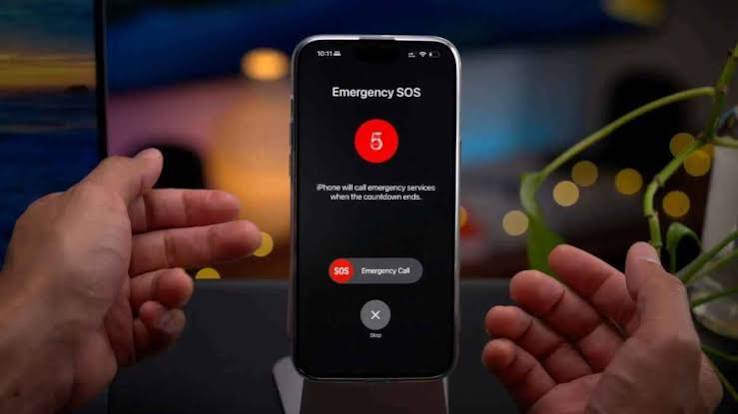
Sometimes, smartphones turn into genuine life-saving tools rather than just devices for communication or entertainment. In emergencies, your iPhone may contain critical information that helps ambulance teams intervene quickly, even if the phone is locked and cannot be accessed via traditional methods.
What is the Medical ID feature and how does it work?
This practical feature allows users to store a wide range of essential health data, in addition to identifying specific people to contact in case of an emergency. This tool is built into the Health app by default, allowing you to add detailed information such as chronic illnesses, allergies, regular medications, blood type, as well as designated emergency contacts.
The greatest value of this feature lies in the ability of paramedics to view this vital information directly from the lock screen, without the need to know the phone’s passcode. This saves rescue teams precious minutes that could be the difference between life and death while dealing with an injured person in their first moments of need.
Simple steps to set up your emergency profile
If you want to protect yourself and haven’t set up this feature yet, the steps are very easy and take only a few minutes:
Open the Health app on your iPhone, tap your account profile icon at the top of the screen, and select (Medical ID). Next, click the Edit button or Get Started, and enter all the information you want to make available to paramedics such as medications, blood type, and allergies, then tap (Done) to save.
It is very important to ensure you enable the Show When Locked option to ensure rescue teams can read this data without needing to unlock the phone. It is also recommended to enable sharing this information during emergency calls.
How to add emergency contacts
In addition to medical data, the iPhone allows you to add family members or close friends to an emergency contacts list. This is easily done by going to the Emergency Contacts section within the Medical ID interface and selecting the person, while clarifying your relationship to them.
When the Emergency SOS feature is triggered, your phone can send automatic alerts to these contacts, which may include your geographic location and its live updates for a specific duration, depending on the settings and your region.
Crucial minutes worth paying attention to
The beauty of this feature is that it does not require you to install annoying third-party apps or purchase complex equipment. Yet, it can provide rescue teams with fundamental information that the patient may be unable to state themselves, especially if they are unconscious or unable to speak.
For this reason, setting up your Medical ID once and forgetting it is not enough; it is always preferred to review and update this data periodically, especially when changing medications, developing new medical conditions, or updating contact numbers, to ensure the information remains accurate and reliable when the need arises.




💬 Share your opinion
We welcome constructive opinions and ask you to maintain politeness.
0 comments